Free


How to Install and Remove XAPK, APK & OBB Files
Installing apps manually on Android is easier than you think. This guide will walk you through everything-from understanding APK files to installing games with OBB data and removing them safely.
What is an APK File?
An APK (Android Package Kit) is the standard file format used to install apps on Android devices. It works similarly to .exe files on Windows.
APK files allow you to:
- Install apps not available on Google Play
- Access modded or early-release apps
- Manually update apps
Enable Unknown Sources on Android
Before installing APK or XAPK files from APKSUBMIT, you need to allow third-party installations.
Steps:
- Go to Settings
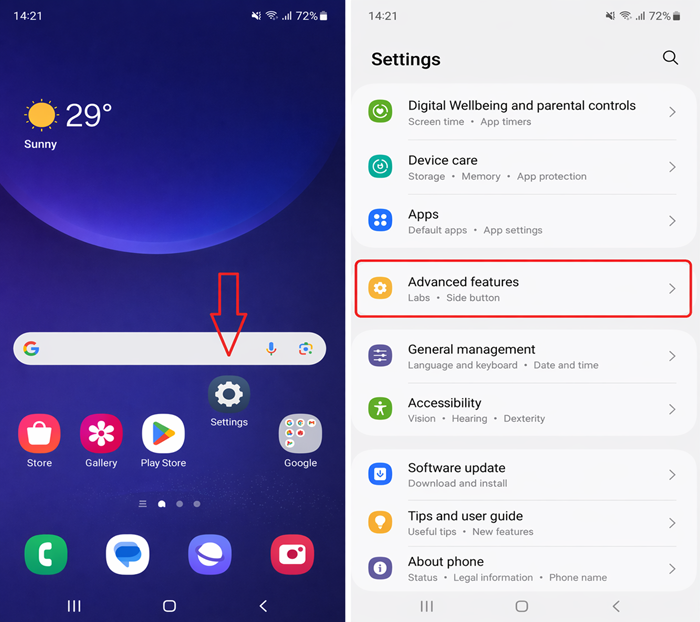
2.Tap Security or Privacy
3.Find Install Unknown Apps
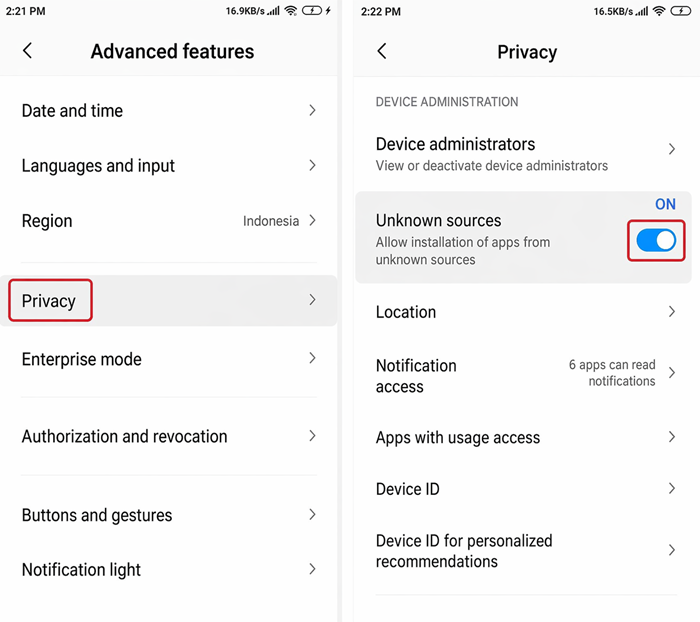
4.Select your browser (Chrome, etc.)
5.Enable Allow from this source
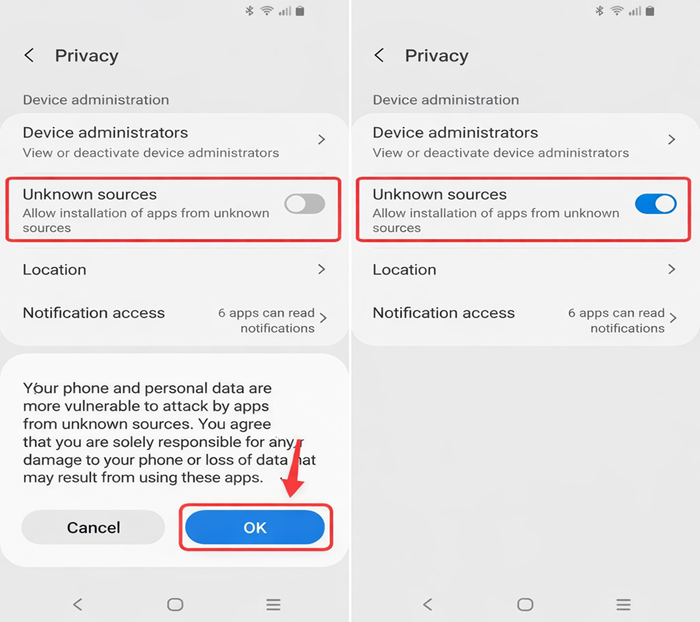
This step is required to install apps outside the Play Store.
Steps to Install APK Files Easily
Installing APK files is simple:
Method 1: Direct Install
1.Download the APK file from APKSUBMIT
2.Open the file using File Manager
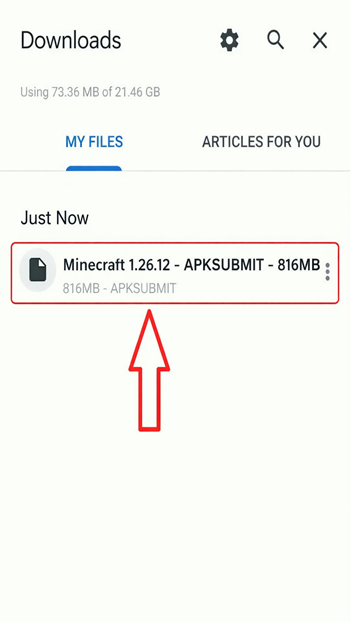
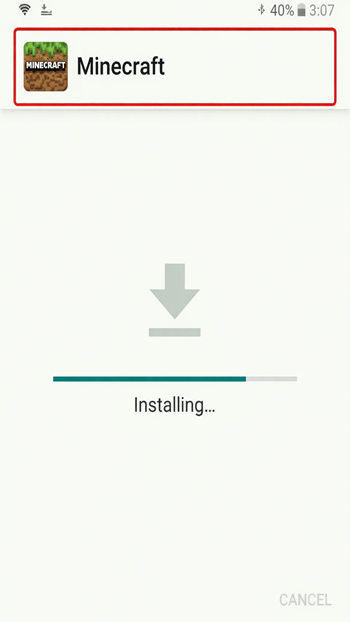
3.Tap Install
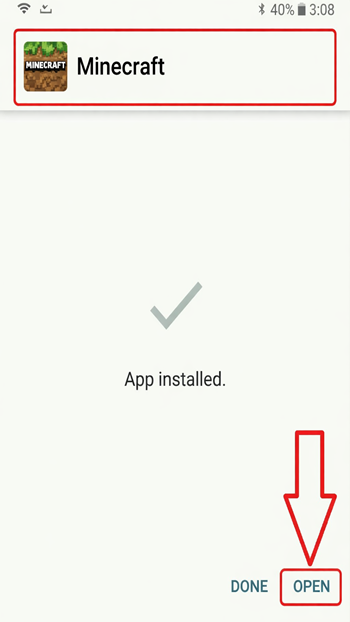
4.Wait for installation to complete
Method 2: Using File Manager
- Locate the APK file in your Downloads folder
- Tap and install manually
What is OBB Data?
OBB (Opaque Binary Blob) files contain additional data used by large games.
They usually include:
- Game assets (maps, textures, sounds)
- Large data files not included in APK
Example: Games with high graphics or open-world environments often require OBB files.
Install APK + OBB Files on Android
To install apps with OBB data, follow these steps:
Step-by-Step Guide:
- Download APK + OBB files from APKSUBMIT
- Install the APK file (do not open it yet)
- Extract the OBB file using apps like ZArchiver
- Move the extracted folder to:
Android/OBB/
- Make sure the folder name matches the app package name
- Launch the game
Your app should now run properly.
Fix APK & OBB Installation Errors
Here are common problems and how to fix them:
App Not Installed
- Remove the old version of the app
- Check available storage
- Re-download the APK file
OBB Not Detected
- Ensure correct folder path: Android/OBB/
- Folder name must match the package name
- Extract files correctly (no extra folders inside)
Parse Error
- APK may not support your Android version
- File could be corrupted
Black Screen or Crash
- Missing OBB data
- Incorrect version installed
Uninstall APK and Remove OBB Data
To fully remove an app:
Step 1: Uninstall APK
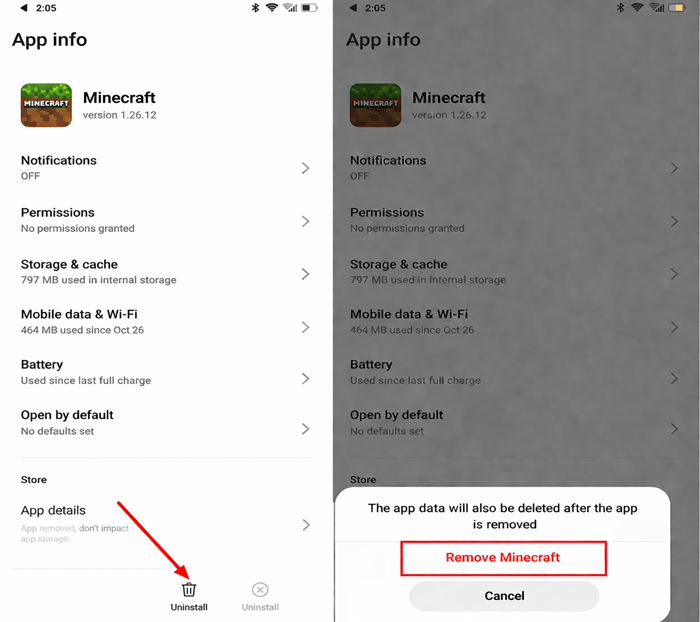
- Go to Settings > Apps
- Select the app
- Tap Uninstall
Step 2: Delete OBB Files
- Open File Manager
- Go to:
Android/OBB/
- Find the folder related to the app
- Delete it
This helps free up storage and removes leftover files.
Final Tips
- Always download files from trusted sources like APKSUBMIT
- Use tools like ZArchiver for easier file management
- Keep your Android system updated for better compatibility
APKSUBMIT.COM
APKSUBMIT.COM
APKSUBMIT.COM
APKSUBMIT.COM
APKSUBMIT.COM
APKSUBMIT.COM
APKSUBMIT.COM
APKSUBMIT.COM
APKSUBMIT.COM
APKSUBMIT.COM


Addons for Minecraft Bedrock
GlitchPixel Addons

Block Craft Sandbox:Build Game
Free
SMD LINKS
Boys Skins For Minecraft PE
Free
Kitoved
Building Mods for Minecraft
Free
Addons for Minecraft
Addons for Minecraft Mods
Free
Addons and Mods for Minecraft
Addons for Minecraft
Free
Kayen Works
ChatCraft Pro for Minecraft
Free
Carrara
Craft Addons for Minecraft PE
Free
Ltd.
Crafting and Building
Free
GeneRe
Furniture Mod For Minecraft
Free
Mods / Addons PE Studio
Guns & Weapons Mod
Free
Mods / Addons PE Studio